Slice
Slice cuts a shape into layers. The input can be a mesh, a Brep, or a surface, or a list of them. The result is a tree of closed curves with one branch per layer; each branch holds the wall curves first and the infill after them. Two slicing modes are available: flat layers (planar) and layers shaped like cones (conical). The component has a compute button and runs only when the button is clicked.
Panel: 1 Slice. Nickname: Slice. Compute button: yes (runs only when the button is clicked).
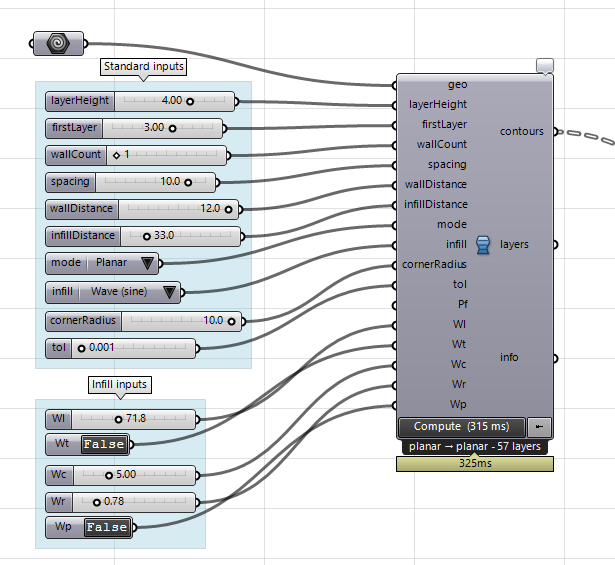
Inputs
| Name | Type | Default | Description |
|---|---|---|---|
geo |
Geometry (list) | Meshes, Breps or surfaces to slice, one item or a list. Each object is sliced and printed in turn | |
layerHeight |
Number | 3 | Layer spacing in mm, greater than 0 |
firstLayer |
Number | 3 | Height of the first section, mm (0 = half the layer spacing) |
wallCount |
Integer | 1 | Number of perimeters, at least 1 |
spacing |
Number | 10 | Legacy curve spacing, mm. Fallback for wallDistance and infillDistance when they are unset |
wallDistance |
Number | 10 | Distance between walls and from the last wall to infill, mm (defaults to spacing) |
infillDistance |
Number | 10 | Distance between infill passes, mm (defaults to spacing) |
mode |
Integer | Slicing mode: 0 = planar, 1 = conical (enable Conical inputs to adjust the angle) | |
infill |
Integer | 0 = none, 1 = zigzag, 2 = concentric, 3 = spiral, 4 = fermat, 5 = sine wave, 6 = graph wave | |
cornerRadius |
Number | 0 | Round sharp contour corners to this radius to correct overfill, mm (0 = off) |
tol |
Number | 0.001 | Slicing and linearization tolerance, mm |
Optional group: Adaptive layer height inputs
Right-click the component to switch this group on. The inputs appear only while the group is enabled.
| Name | Type | Default | Description |
|---|---|---|---|
hMin |
Number | 1 | Adaptive minimum layer height, mm |
hMax |
Number | 3 | Adaptive maximum layer height, mm |
Optional group: Conical (non-planar) inputs
Right-click the component to switch this group on. The inputs appear only while the group is enabled.
| Name | Type | Default | Description |
|---|---|---|---|
coneAngle |
Number | 20 | Cone half-angle in deg for mode 1, affecting layer spacing, inner walls and infill |
nozzleClear |
Number | 25 | Maximum conical surface angle in deg before slicing reports a nozzle-clearance warning |
Optional group: Zigzag angle input
Right-click the component to switch this group on. The inputs appear only while the group is enabled.
| Name | Type | Default | Description |
|---|---|---|---|
angle |
Number | 0 | Zigzag direction, deg |
Optional group: Wave infill inputs (infill 5 / 6): period, amplitude, graph curve
Right-click the component to switch this group on. The inputs appear only while the group is enabled.
| Name | Type | Default | Description |
|---|---|---|---|
profile |
Text | Graph Mapper map output for infill 6, used with Wave inputs enabled (empty = sine wave) | |
waveLen |
Number | 20 | Wave period along a row, mm |
waveTangent |
Boolean | Make mirrored wave peaks touch when true, or separate them by waveClearance when false | |
waveClearance |
Number | 0 | Gap left between mirrored peaks when waveTangent is off, mm (0 = 0.2 x infillDistance) |
waveRes |
Number | 0.5 | Sampling step along a wave row, mm |
waveRepeat |
Boolean | Repeat the graph forward when true, or alternate forward and backward for continuous joins when false |
Optional group: Bricklayer: interlock adjacent wall loops by half a layer height
Right-click the component to switch this group on. The inputs appear only while the group is enabled.
| Name | Type | Default | Description |
|---|---|---|---|
brickShift |
Number | 0.5 | Wall Z shift as a fraction from 0 to 1 of the local layer gap (0.5 = half a layer) |
brickOverlap |
Number | 0.5 | Minimum shared fraction of the shorter adjacent wall loop for interlocking, from 0 to 0.95 |
brickOuter |
Boolean | Shift the outermost wall instead of leaving it flat. This changes the visible surface | |
brickRamp |
Integer | 1 | Layers left flat at the bottom and the top |
Optional group: Non-planar infill and walls: wave-modulate path Z
Right-click the component to switch this group on. The inputs appear only while the group is enabled.
| Name | Type | Default | Description |
|---|---|---|---|
npAmp |
Number | 0.4 | Infill Z wave amplitude in mm (0 = off), limited to 0.4 times each adjacent layer gap |
npWave |
Number | 20 | Infill Z wave period, mm |
npDir |
Number | 0 | Direction the Z wave travels, deg (default = the zigzag angle) |
npRes |
Number | 1 | Infill resampling step before modulation, mm |
npPhase |
Number | 0.5 | Phase advance per layer, turns (0.5 = next layer’s trough over this layer’s crest) |
npRamp |
Integer | 1 | Layers over which the amplitude ramps in and out |
npWallAmp |
Number | 0 | Wall Z wave amplitude, mm (0 = off) |
npLoopPhase |
Number | 0.25 | Phase advance per wall loop, turns |
npWallOuter |
Boolean | Modulate the outermost wall. This changes the visible surface |
Outputs
| Name | Type | Description |
|---|---|---|
contours |
Curve (tree) | One branch per layer, walls then infill. With several objects the branch path is object, then layer |
layers |
Integer | Number of layers over all objects |
info |
Text | Diagnostics and warnings |
Back to Components.