Pareto Select
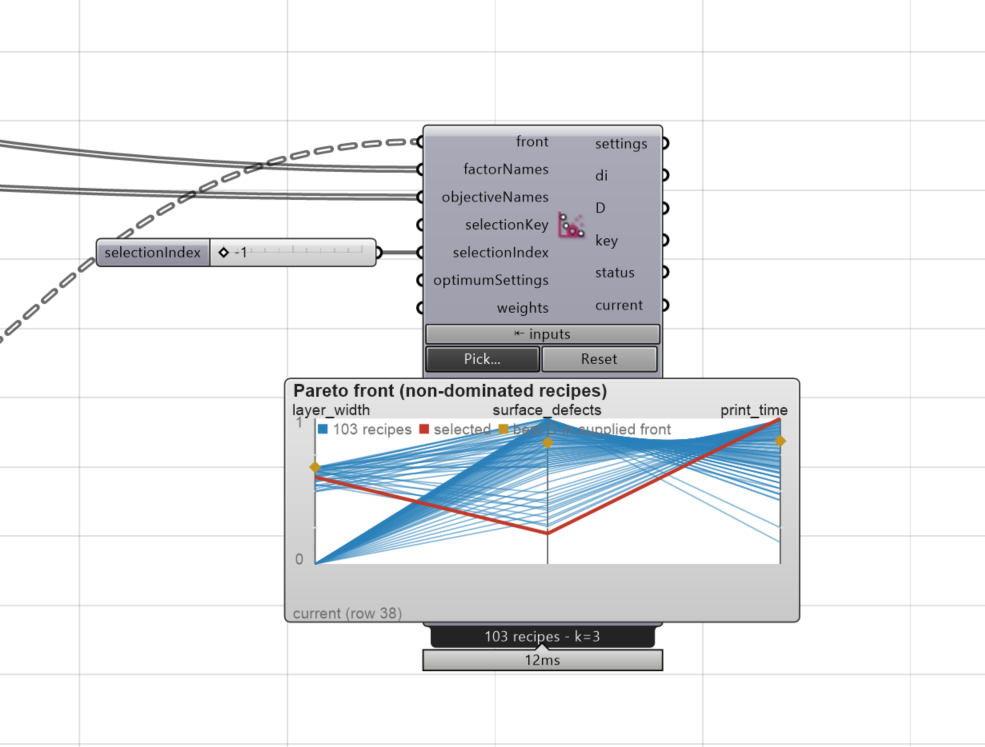
Pareto Select shows the trade-off front that Desirability
found and lets you pick one recipe from it by clicking. The chosen
recipe - its settings, its score per goal and its overall D - comes out
of the component and stays with the document, even when the DoE components
upstream are switched off or their front changes.
Panel: 6 Calibrate. Nickname: Pareto. Compute button: no (runs on every change).
Inputs
| Name | Type | Default | Description |
|---|---|---|---|
front |
Number (tree) | The pareto output of Desirability, one branch per recipe: factor values, one desirability per active goal, D. Optional once a selection is stored | |
factorNames |
Text (list) | Factor names from DoE Design in model order, exactly one per factor value | |
objectiveNames |
Text (list) | Names of the active goals in model order, the objectives output of Desirability. The axes are desirabilities from 0 to 1, not response units | |
selectionKey |
Text | Recipe key from this component’s key output for selection without the picker, valid only for its original front | |
selectionIndex |
Integer | -1 | Select a recipe by current branch index from 0 (-1 = none), reapplied only when this input changes |
optimumSettings |
Number (list) | Desirability settings output to mark the recommended recipe on the plot (unwired = highest D) | |
weights |
Number (list) | Importance per active objective in objectiveNames order, 0 or more each. Marks the recipe with the highest weighted geometric mean of the front’s own desirabilities, response goals only, without re-running Desirability |
All inputs are optional. Without a front the component still emits a recipe it stored earlier.
Optional group: Confirm selected recipe
Right-click the component to switch this group on. The inputs appear only while the group is enabled.
| Name | Type | Description |
|---|---|---|
confirmValues |
Number (list) | Measured values for the selected recipe in objectiveNames order |
Outputs
| Name | Type | Description |
|---|---|---|
settings |
Number (list) | Selected factor values in actual units, factorNames order. Empty without a selection |
di |
Number (list) | Selected recipe’s desirability per active objective, 0 to 1 |
D |
Number | Selected recipe’s overall desirability from 0 to 1 |
key |
Text | Recipe key for selectionKey, valid only for the front it was issued from |
status |
Text | Selection status: current, stale (front changed), restored, ambiguous, or why a request was refused |
current |
Boolean | True only when the stored recipe is verified on the live front under the same identity |
confirmReport |
Text | Confirmation measurements checked against the selected recipe’s prediction intervals |
How to use it
- Enable the
paretogroup on Desirability and compute; wire itsparetooutput tofront, the factor names tofactorNames, and itsobjectivesoutput toobjectiveNames. - Click a point on the strip under the component (two goals: a scatter; three or more: one line per recipe across one axis per goal; one goal: a strip). Press Pick… for a larger window; there the arrow keys walk the front and Enter confirms. Hovering shows the full recipe.
- Read
settingsfor the print. Reset forgets the choice; both are undoable. - Optional: wire a list of
weights(one per goal) to see which recipe a given importance would pick. Move the numbers and watch the green square walk along the front. This is a probe for your preference, not a selection: click the recipe to choose it.
The axes are desirabilities from 0 to 1, not measured units: a value of 0.8 on the
width axis means the recipe meets the width goal to 80 %.
Why the front is drawn over desirabilities
A Pareto front and a desirability optimum are often described as two different
methods, and they are - but they share one ingredient. The goal you type for each
result (min, max, target=7 in 6..8) does two things: it turns a measured value
into a score from 0 to 1 where bigger is always better, and, together with the weights,
it folds all the scores into the single number D. Only the first step is needed to
draw the front. Without it a target goal could not be put on a trade-off plot at all,
because “close to 7 mm” has no direction in millimetres. So the front uses your goals
and their bounds, but not your weights. The weights are a preference, and the front is
there precisely so that you can see the trade-offs before committing to one. Pareto
Select is where that preference is applied afterwards: by clicking, or by wiring
weights to see where it would land.
Two things follow. Recipes outside a goal’s bounds all score 0 on that axis and are
shown as one point, so the bounds you type decide what counts as acceptable. And factor
priors (prefer a low layer height) are not on the axes, which is why Desirability’s
recommendation can sit off the front while still carrying the highest D.
What happens when the front changes
The choice is stored by its numbers, not by its position in the list. If Desirability
recomputes and the same recipe is still on the front, the choice stays current, even
when the list is in a different order. If the front is different - a goal, a weight or
a bound changed - the component keeps the stored numbers, sets current to false, and
says front changed on the component; it never quietly switches to another recipe. A
recipe that still matches is shown dashed as a candidate; click it to accept the new
front. Two identical recipes on one front are reported as ambiguous.
Back to Components.