Legend
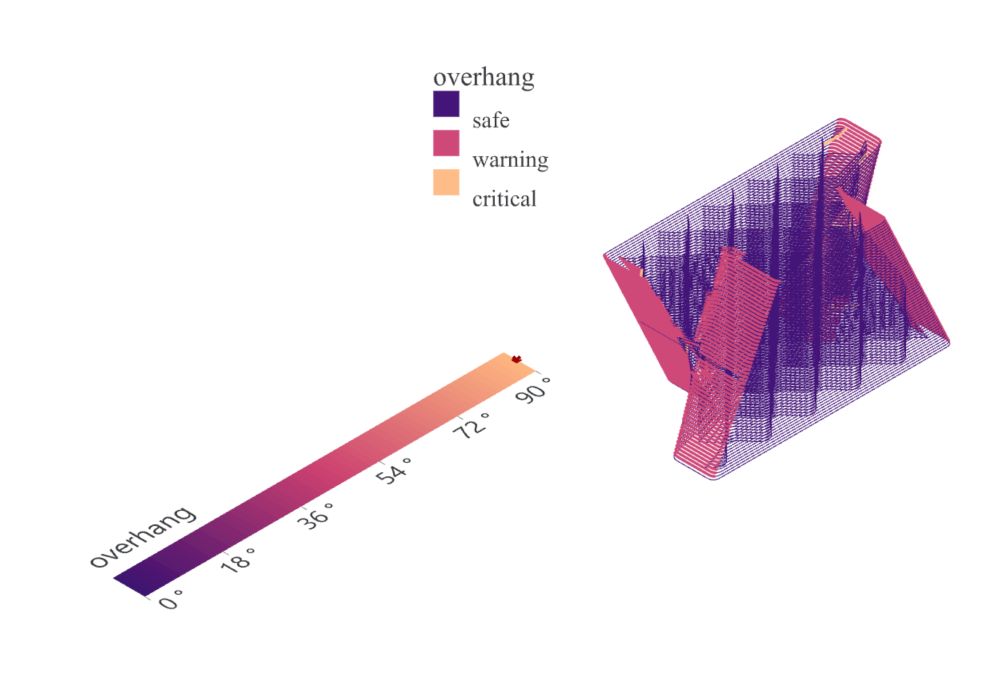
Legend draws a legend for any data range: a continuous ramp,
thresholded classes, named groups, or a size scale. It exists because
Grasshopper has no legend of its own. Wire the legend output of
Overhang or Interlayer Time and the legend always
matches the colours those components painted; wire your own values,
min and max instead to describe any other scale. Every explicit
input on the component overrides the matching field of the wire, so
one Legend can be nudged - a different title, a bigger font - without
detaching it from the source.
Panel: 5 Analyze. Nickname: Legend. Compute button: no (runs on every change).
Inputs
| Name | Type | Default | Description |
|---|---|---|---|
legend |
Text | Legend definition text from Overhang or Interlayer Time, with wired inputs overriding its matching fields | |
values |
Number (list) | Data to color. Also sets the domain when min and max are unwired. The colors output gives one color per value | |
min |
Number | 0 | Domain start. Unwired takes the wire’s, else the values’ minimum, else 0 |
max |
Number | 100 | Domain end. Unwired takes the wire’s, else the values’ maximum, else 1 |
type |
Integer | 0 | 0 = continuous ramp, 1 = classes (threshold bands), 2 = groups (named categories), 3 = size (circle size scale) |
scheme |
Text | blues | Palette name or number from the palette table, or custom to use colors or gradient |
title |
Text | Title above the legend | |
show |
Boolean | true | Draw the legend in the viewport (outputs solve either way) |
Optional group: Style inputs (custom colors, breaks, labels, unit, reverse, n/a swatch)
Right-click the component to switch this group on. The inputs appear only while the group is enabled.
| Name | Type | Description |
|---|---|---|
colors |
Colour (list) | Custom colors: ramp stops for continuous and size, or one per class or group |
gradient |
Colour (list) | Grasshopper Gradient or color list for custom colors, overriding colors and preserving Gradient stop positions |
breaks |
Number (list) | Classes: ascending thresholds, k thresholds give k+1 classes. Size: the sample values shown |
labels |
Text (list) | Class or group names. Classes without a name show their range |
unit |
Text | Unit appended to every number |
reverse |
Boolean | Flip the scale direction |
naLabel |
Text | Label of the grey ‘unavailable’ swatch (empty = no swatch unless the wire carries one) |
Optional group: Text inputs (font, size, color, decimals, ticks, frame)
Right-click the component to switch this group on. The inputs appear only while the group is enabled.
| Name | Type | Default | Description |
|---|---|---|---|
font |
Text | Segoe UI | Installed font name for legend labels (default Segoe UI) |
textSize |
Number | 11 | Text height: px for viewport and floating, model units for a plane |
textColor |
Colour | Text and tick color | |
decimals |
Integer | -1 | Decimal places (-1 = from the tick step) |
ticks |
Integer | 0 | Number of continuous-scale ticks (0 = automatic spacing) |
frame |
Boolean | Draw a panel behind the legend |
Optional group: Placement inputs (viewport / plane / floating, anchor, orientation, geometry)
Right-click the component to switch this group on. The inputs appear only while the group is enabled.
| Name | Type | Default | Description |
|---|---|---|---|
placement |
Integer | 0 | 0 = viewport overlay, 1 = fixed to plane in model units, 2 = floating billboard at point, facing the camera at constant screen size |
anchor |
Integer | 2 | Anchor index: 0 = TL, 1 = TR, 2 = BL, 3 = BR, 4 = top, 5 = bottom, 6 = left, 7 = right |
orientation |
Integer | 0 | 0 = horizontal, 1 = vertical |
plane |
Plane | Plane for placement 1 (origin = the anchored corner) | |
point |
Point | Anchor point for placement 2 | |
length |
Number | 220 | Bar length: px for viewport and floating, model units for a plane |
thickness |
Number | 14 | Bar thickness, swatch size or largest size circle radius, same unit as length |
margin |
Number | 18 | Viewport: distance from the viewport edge, px |
Outputs
| Name | Type | Description |
|---|---|---|
colors |
Colour (list) | One color per values entry from this scale. Paints any geometry consistently with the legend |
mesh |
Mesh | The legend as a vertex colored mesh in model space for plane and floating placements. Bakeable |
labels |
Text (list) | Legend texts, one per frames plane, for plane and floating placements. Feed a Text Tag 3D or bake |
frames |
Plane (list) | Text planes in Rhino document units, one per labels entry |
spec |
Text | Resolved legend definition text to forward to another Legend |
info |
Text | Resolved scale, range and placement details |
Back to Components.